

Description
Fast Archive Extraction Online Tool
Archive Extractor is a lightweight, web-based utility designed to simplify the process of extracting compressed files across multiple formats. It enables users to access and decompress over 70 archive types directly through a browser, eliminating the need for local software installations. The tool supports password-protected archives and multi-part archives such as zip.001, rar.part1, and z01, making it ideal for handling complex file distributions. It is particularly useful for professionals and casual users who frequently work with diverse compressed files from various sources, including software downloads, digital media packages, and archived datasets. The tool is accessible from any device with internet connectivity, allowing seamless file extraction on Windows, Mac, and Linux systems. Since it operates online, no installation or system configuration is required, reducing setup time and minimizing compatibility concerns. The developer did not provide additional information about the background or development history of the tool.
Key Features & Capabilities
- Multi-format support: Extracts over 70 archive types, including 7z, zip, rar, tar, dmg, iso, gz, cab, bz2, wim, ace, arj, lzh, lzma, xz, z, zoo, and more.
- Password-protected archive handling: Allows extraction of archives secured with passwords, enabling access to protected content.
- Multi-part archive compatibility: Supports split archives such as zip.001, rar.part1, z01, and similar formats, ensuring complete file recovery.
- Browser-based operation: No installation required; runs entirely in the web browser, accessible from any device with internet access.
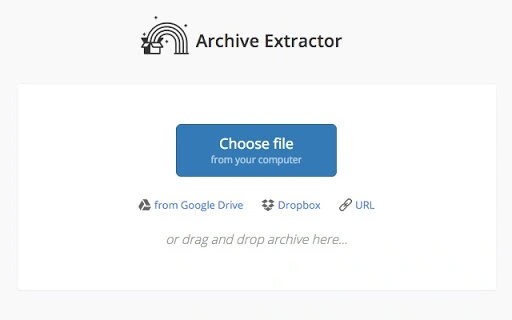
- Simple drag-and-drop interface: Users can upload files via drag-and-drop or file selection, streamlining the extraction workflow.
These capabilities make Archive Extractor a practical solution for users managing diverse archive files. For example, a researcher downloading a multi-part dataset in zip.001 format can extract all components without installing third-party software. Similarly, a designer receiving a password-protected .rar file with project assets can securely access the contents directly through the tool. The online nature ensures consistent functionality across platforms, reducing the need for multiple local tools.
User Interface, Workflow & Performance
The user interface is minimalistic and focused on core functionality. The main screen features a central upload zone with clear instructions for dragging and dropping files or selecting them manually. After upload, the tool displays a list of contained files with a preview option, allowing users to verify content before extraction. Navigation is straightforward, with a single extraction button and a progress indicator during processing. The workflow is efficient, typically completing extraction in seconds for small to medium files. The developer did not specify resource usage details, and performance observations are based on general software behavior patterns. Stability appears consistent due to the web-based architecture, which isolates the process from local system interference. However, performance may vary depending on internet speed and file size, particularly for large archives. No local file storage is retained after extraction, enhancing privacy and security.
Compatibility & System Requirements
Archive Extractor is compatible with Windows, Mac, and Linux operating systems, as it operates entirely through a web browser. This cross-platform accessibility means users can access the tool from any device with a modern browser and internet connection. The installation size is listed as 0.5 MB, though this refers to the web application footprint rather than a downloadable file, since the tool does not require installation. Exact system requirements were not listed. The tool does not rely on local software dependencies, making it suitable for low-spec devices. However, users should ensure their browser supports the necessary file handling features, such as drag-and-drop and file stream processing. The developer did not provide additional details on hardware or software prerequisites.
Pros and Cons
Pros
- Supports over 70 archive formats, including rare and niche types.
- Handles password-protected and multi-part archives without additional tools.
- Zero installation required—accessible immediately via browser.
- Works across Windows, Mac, and Linux systems with no configuration.
- Lightweight and fast for typical extraction tasks.
Cons
- Dependent on internet connectivity for operation.
- No offline functionality available.
- File size limits may apply, though not specified.
- Privacy concerns may arise with sensitive or confidential files.
- Performance may be affected by slow or unstable internet connections.
FAQ Section
Is Archive Extractor available for offline use?
No, the tool operates exclusively online and requires an active internet connection to function. It cannot be used without access to the web.
Can I extract password-protected archives with this tool?
Yes, Archive Extractor supports the extraction of password-protected archives, provided the user enters the correct password during the process.
What file formats does the tool support?
The tool supports over 70 archive formats, including 7z, zip, rar, tar, dmg, iso, gz, cab, bz2, wim, ace, arj, lzh, lzma, xz, z, zoo, and many others listed in the official documentation.
Is my data secure when using this tool?
Since the tool operates in the browser and does not store files on its servers after extraction, data is not retained. However, users should exercise caution when uploading sensitive files due to the nature of online processing.
How often is the tool updated?
Update frequency was not specified by the developer. Users should rely on the latest version available through the official website.
Final Thoughts + CTA
Archive Extractor delivers a streamlined, no-frills solution for extracting compressed files across a broad range of formats. Its ability to handle password-protected and multi-part archives without installation makes it a valuable tool for users who need quick access to compressed content. While it relies on internet connectivity and lacks offline capabilities, its cross-platform availability and support for over 70 formats provide significant convenience. The tool is especially beneficial for professionals, students, and casual users who frequently encounter diverse archive types and want a simple, reliable way to access their contents. With no installation, minimal learning curve, and broad compatibility, it stands out as a practical utility for modern workflows. Download Archive Extractor now.
Guides & Tutorials for Archive Extractor App for Chrome
How to install Archive Extractor App for Chrome
- Click the Preview / Download button above.
- Once redirected, accept the terms and click Install.
- Wait for the Archive Extractor App for Chrome download to finish on your device.
How to use Archive Extractor App for Chrome
This software is primarily used for its core features described above. Open the app after installation to explore its capabilities.
User Reviews for Archive Extractor App for Chrome 0
No reviews found





